E-ink 캘린더 업그레이드

 Joonghyeon Ahn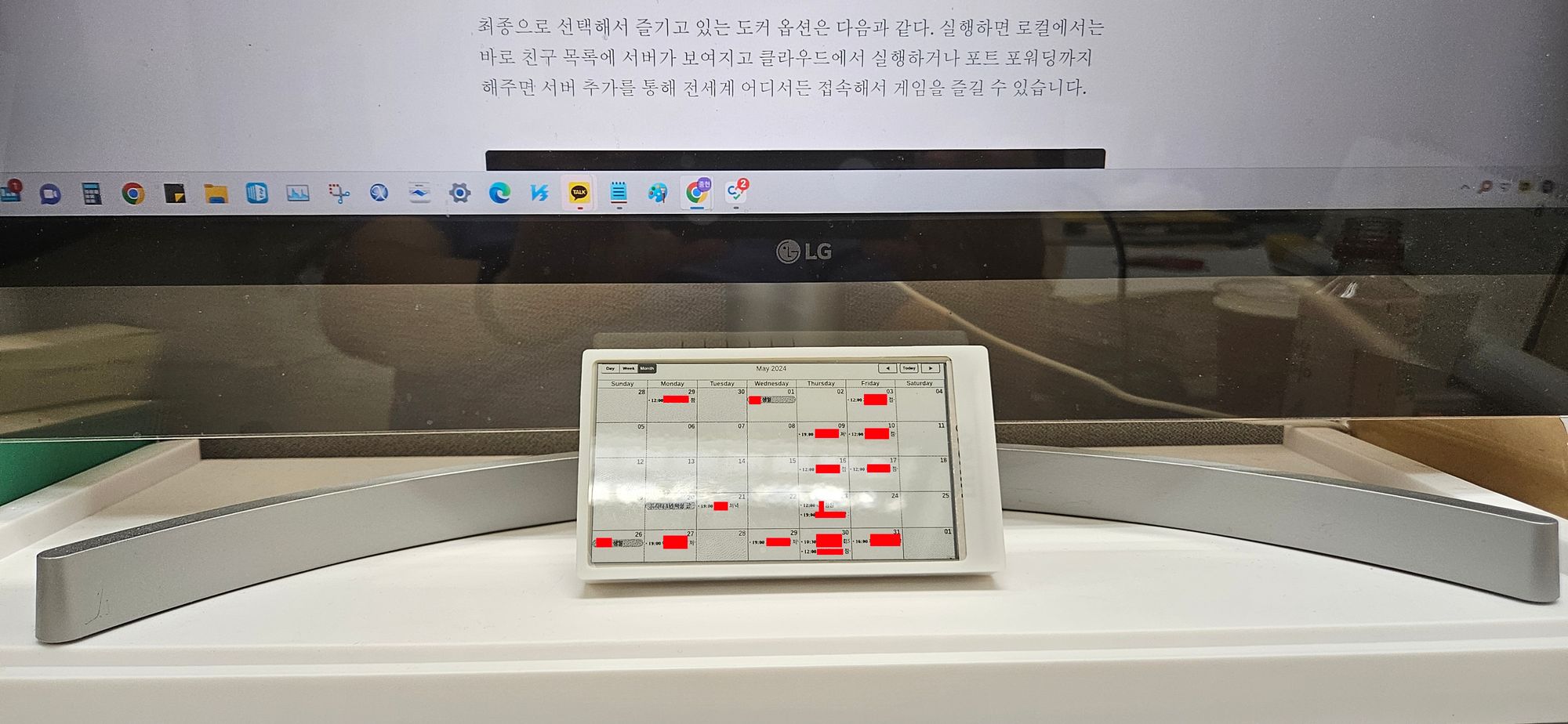
2년 동안 잘 쓰고 있던 E-ink 캘린더를 업그레이드 했다. 정확히 말하면 업그레이드라기 보단 옆그레이드지만.
기존엔 홈서버에서 구글 캘린더를 불러와서 Lilygo T5-4.7의 해상도(960 * 540)에 맞게 이미지를 생성한 뒤 이를 변환해 캘린더가 받는 형식이었다. 그런데 한동안 해외 생활을 해야할 상황이어서 홈서버를 처분해야 한다. 이 때문에 서버 없이도 캘린더가 알아서 일정을 보여주도록 바꿔야 할 필요가 생겼다.
제미나이에게 상황을 설명하고 서버 없이 동작하도록 할 수 없느냐고 물었더니 아주 훌륭한 방안을 제시했다.
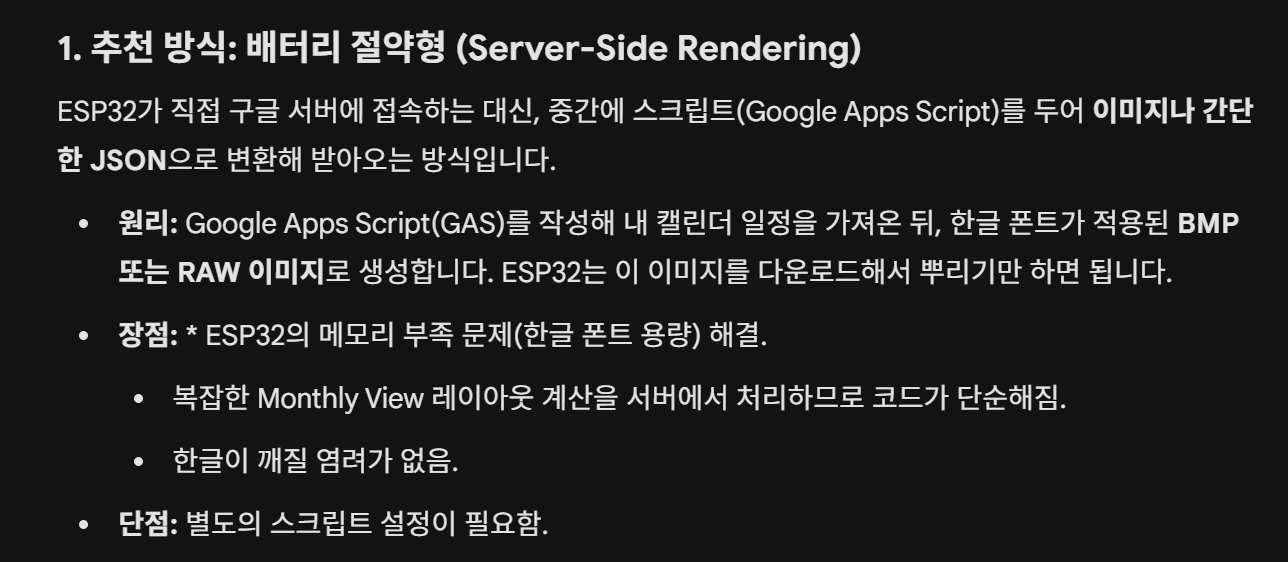
서버를 없애려고 했지만, 서버가 없어지지 않는(?) 그런 방식을 제시한 것이다. 제미나이와 대화를 하면서 구체화했다. 구글 앱스 스크립트에 넣을 코드를 알아서 만들어줬다.
// 1. 보안을 위한 토큰 (아두이노 코드의 scriptUrl 끝에 붙은 토큰과 일치해야 함)
const ACCESS_TOKEN = "*******";

function doGet(e) {
  // 보안 검사: 토큰이 없거나 일치하지 않으면 차단
  if (!e.parameter.token || e.parameter.token !== ACCESS_TOKEN) {
    return ContentService.createTextOutput(JSON.stringify({error: "Unauthorized Access"}))
                         .setMimeType(ContentService.MimeType.JSON);
  }

  try {
    const now = new Date();

    // 아두이노에서 보낸 파라미터가 있으면 사용하고, 없으면 현재 날짜 사용
    // (버튼을 눌러 이전/다음달을 요청할 때 파라미터가 들어옵니다)
    const year = e.parameter.year ? parseInt(e.parameter.year) : now.getFullYear();
    const month = e.parameter.month ? parseInt(e.parameter.month) - 1 : now.getMonth();

    // 요청받은 월의 1일 00:00:00 ~ 마지막 날 23:59:59 계산
    const startDate = new Date(year, month, 1, 0, 0, 0);
    const endDate = new Date(year, month + 1, 0, 23, 59, 59);

    // 구글 기본 캘린더 가져오기
    const calendar = CalendarApp.getDefaultCalendar();
    const events = calendar.getEvents(startDate, endDate);

    // { "날짜": ["일정1", "일정2", "일정3"] } 구조로 변환
    let scheduleData = {};

    events.forEach(event => {
      // 일정이 시작되는 날짜(1~31) 가져오기
      const day = event.getStartTime().getDate();

      if (!scheduleData[day]) {
        scheduleData[day] = [];
      }

      // ESP32 화면 공간(칸 크기)을 고려해 하루 최대 3개까지만 전송
      if (scheduleData[day].length < 3) {
        let title = event.getTitle();
        // 한글 기준 약 10~12자 내외로 자르기 (줄바꿈 방지)
        if (title.length > 12) {
          title = title.substring(0, 11) + "..";
        }
        scheduleData[day].push(title);
      }
    });

    // 최종 반환 객체
    const result = {
      year: year,
      month: month + 1, // 다시 1~12 형식으로 변환
      data: scheduleData
    };

    // JSON 형식으로 결과 반환
    return ContentService.createTextOutput(JSON.stringify(result))
                         .setMimeType(ContentService.MimeType.JSON);

  } catch (f) {
    // 에러 발생 시 내용을 JSON으로 반환 (디버깅용)
    return ContentService.createTextOutput(JSON.stringify({error: f.toString()}))
                         .setMimeType(ContentService.MimeType.JSON);
  }
}
이 코드는 비공개 ics 파일을 땡겨와 날짜와 일정 제목을 json 형태로 만들어준다. 컴퓨팅파워가 약한 ESP32에서 처리하기가 딱이다.
이후엔 무한 삽질이 이어졌다.
우선 한글을 제대로 표시되기까지 꽤 오래 걸렸다. 전체 한글 11172자를 다 넣지는 못하고 많이 쓰는 한글 2350자만 넣었다. 그래도 .h 파일이 1MB를 넘었다. PSRAM이랑 뭐랑 다 사용해서 해결했다(제미나이가 알려줬다)
표나 글자 위치도 하나하나 찍어줘야해서 몇번을 제미나이한테 이렇게 해줘, 저렇게 해줘를 반복하면서 보기 좋게 맞췄다.
그 결과 아래 코드를 최종적으로 만들어냈고, 꽤 만족하는 수준이라 여기서 멈췄다.
#include <Arduino.h>
#include <WiFi.h>
#include <WiFiClientSecure.h>
#include <HTTPClient.h>
#include <ArduinoJson.h>
#include <time.h>
#include <WebServer.h>
#include <Preferences.h> // 설정 저장을 위한 라이브러리
#include "epd_driver.h"
#include "my_font_big.h"
#include "my_font_small.h"

// 1. 설정 및 변수
const char* scriptUrl = "구글 앱스 스크립트가 만들어준 URL";

#define BUTTON_NEXT 34
#define SCREEN_WIDTH  960
#define SCREEN_HEIGHT 540
#define CELL_WIDTH    (SCREEN_WIDTH / 7)
#define CELL_HEIGHT   90

RTC_DATA_ATTR int currentYear = 0;
RTC_DATA_ATTR int currentMonth = 0;

uint8_t *framebuffer;
Preferences preferences;
WebServer server(80);

// 함수 선언
void fetchCalendarData();
void renderCalendar(DynamicJsonDocument& doc);
String cleanAndCut(String str, int maxLen);
void startConfigMode();
void showStatusMessage(const char* title, const char* msg);

void setup() {
    delay(500);
    Serial.begin(115200);

    if (psramInit()) {
        epd_init();
        framebuffer = (uint8_t *)ps_calloc(sizeof(uint8_t), EPD_WIDTH * EPD_HEIGHT / 2);
    }

    pinMode(BUTTON_NEXT, INPUT_PULLUP);

    // 저장된 WiFi 정보 불러오기
    preferences.begin("wifi-config", false);
    String ssid = preferences.getString("ssid", "");
    String pass = preferences.getString("pass", "");

    // 1. WiFi 접속 시도
    if (ssid == "") {
        startConfigMode(); // 정보 없으면 바로 설정 모드
    } else {
        WiFi.begin(ssid.c_str(), pass.c_str());
        unsigned long startWait = millis();
        bool connected = true;

        while (WiFi.status() != WL_CONNECTED) {
            if (millis() - startWait > 20000) { // 20초 타임아웃
                connected = false;
                break;
            }
            delay(500);
            Serial.print(".");
        }

        if (!connected) {
            startConfigMode(); // 접속 실패 시 설정 모드
        }
    }

    // 2. 접속 성공 시 달력 로직
    esp_sleep_wakeup_cause_t wakeup_reason = esp_sleep_get_wakeup_cause();
    if (wakeup_reason != ESP_SLEEP_WAKEUP_UNDEFINED) {
        currentMonth++;
        if (currentMonth > 12) { currentMonth = 1; currentYear++; }
    }
    if (currentYear == 0) { currentYear = 2026; currentMonth = 2; }

    fetchCalendarData();

    esp_sleep_enable_ext0_wakeup(GPIO_NUM_34, 0);
    esp_deep_sleep_start();
}

// --- WiFi 설정 모드 (AP 모드 및 웹페이지) ---
void startConfigMode() {
    memset(framebuffer, 0xFF, EPD_WIDTH * EPD_HEIGHT / 2);
    showStatusMessage("WiFi 설정 모드 진입", "스마트폰으로 'Calendar-Setup' 와이파이에 접속하세요.");

    WiFi.softAP("Calendar-Setup", "12345678");
    Serial.println("AP Mode Started: Calendar-Setup");

    server.on("/", HTTP_GET, []() {
        String html = "<html><head><meta charset='UTF-8'></head><body>"
                      "<h1>WiFi 설정</h1>"
                      "<form action='/save' method='POST'>"
                      "SSID: <input type='text' name='s'><br>"
                      "Password: <input type='password' name='p'><br>"
                      "<input type='submit' value='저장 및 재시작'>"
                      "</form></body></html>";
        server.send(200, "text/html", html);
    });

    server.on("/save", HTTP_POST, []() {
        String s = server.arg("s");
        String p = server.arg("p");
        preferences.putString("ssid", s);
        preferences.putString("pass", p);
        server.send(200, "text/html", "<h1>저장되었습니다. 기기를 재시작합니다.</h1>");
        delay(2000);
        ESP.restart();
    });

    server.begin();
    while (true) { server.handleClient(); delay(10); }
}

void showStatusMessage(const char* title, const char* msg) {
    int32_t tx = 100, ty = 100;
    writeln((const GFXfont*)&my_font_big, (char*)title, &tx, &ty, framebuffer);
    tx = 100; ty = 150;
    writeln((const GFXfont*)&my_font_small, (char*)msg, &tx, &ty, framebuffer);
    epd_poweron();
    epd_clear();
    epd_draw_grayscale_image(epd_full_screen(), framebuffer);
    epd_poweroff_all();
}

// --- 기존 달력 로직 (수정 사항 유지) ---
String cleanAndCut(String str, int maxLen) {
    str.replace("\n", ""); str.replace("\r", ""); str.trim();
    String res = ""; int charCount = 0, i = 0;
    while (i < str.length() && charCount < maxLen) {
        unsigned char c = str[i];
        if (c < 128) i += 1; else if (c < 224) i += 2; else if (c < 240) i += 3; else i += 4;
        charCount++;
    }
    res = str.substring(0, i); if (i < str.length()) res += "..";
    return res;
}

void fetchCalendarData() {
    HTTPClient http;
    WiFiClientSecure client;
    client.setInsecure();
    String fullUrl = String(scriptUrl) + "&year=" + String(currentYear) + "&month=" + String(currentMonth);
    http.setFollowRedirects(HTTPC_STRICT_FOLLOW_REDIRECTS);
    if (http.begin(client, fullUrl)) {
        int httpCode = http.GET();
        if (httpCode == HTTP_CODE_OK) {
            String payload = http.getString();
            DynamicJsonDocument doc(40000);
            if (!deserializeJson(doc, payload)) renderCalendar(doc);
        }
        http.end();
    }
}

void renderCalendar(DynamicJsonDocument& doc) {
    memset(framebuffer, 0xFF, EPD_WIDTH * EPD_HEIGHT / 2);
    int year = doc["year"];
    int month = doc["month"];
    JsonObject data = doc["data"];

    char title[32]; sprintf(title, "%d년 %d월", year, month);
    int32_t tx = 430, ty = 25;
    writeln((const GFXfont*)&my_font_big, title, &tx, &ty, framebuffer);

    int grid_y = 90, header_line_y = grid_y - 35;
    epd_fill_rect(0, header_line_y, SCREEN_WIDTH, 35, 230, framebuffer);

    const char* days[] = {"일", "월", "화", "수", "목", "금", "토"};
    for (int i = 0; i < 7; i++) {
        int32_t dx = i * CELL_WIDTH + (CELL_WIDTH / 2) - 15, dy = grid_y - 8;
        writeln((const GFXfont*)&my_font_big, days[i], &dx, &dy, framebuffer);
    }

    struct tm timeinfo = {0};
    timeinfo.tm_year = year - 1900; timeinfo.tm_mon = month - 1; timeinfo.tm_mday = 1;
    mktime(&timeinfo);
    int firstDayOfWeek = timeinfo.tm_wday;

    for (int day = 1; day <= 31; day++) {
        if (month == 2 && day > 29) break;
        if ((month == 4 || month == 6 || month == 9 || month == 11) && day > 30) break;
        int pos = day - 1 + firstDayOfWeek, col = pos % 7, row = pos / 7;
        int x = col * CELL_WIDTH, y = grid_y + row * CELL_HEIGHT;

        int32_t dx = x + 5, dy = y + 18;
        char dStr[4]; sprintf(dStr, "%d", day);
        writeln((const GFXfont*)&my_font_big, dStr, &dx, &dy, framebuffer);

        String dayKey = String(day);
        if (data.containsKey(dayKey)) {
            JsonArray events = data[dayKey].as<JsonArray>();
            for (int i = 0; i < (int)events.size() && i < 3; i++) {
                String entry = cleanAndCut(events[i].as<String>(), 10);
                int32_t ex = x + 5, ey = y + 40 + (i * 21);
                writeln((const GFXfont*)&my_font_small, (char*)entry.c_str(), &ex, &ey, framebuffer);
            }
        }
    }

    for (int i = 0; i <= 7; i++) epd_draw_line(i * CELL_WIDTH, header_line_y, i * CELL_WIDTH, SCREEN_HEIGHT, 0, framebuffer);
    epd_draw_line(0, header_line_y, SCREEN_WIDTH, header_line_y, 0, framebuffer);
    for (int i = 0; i <= 5; i++) epd_draw_line(0, grid_y + i * CELL_HEIGHT, SCREEN_WIDTH, grid_y + i * CELL_HEIGHT, 0, framebuffer);

    epd_poweron();
    epd_clear();
    epd_draw_grayscale_image(epd_full_screen(), framebuffer);
    epd_poweroff_all();
}

void loop() {}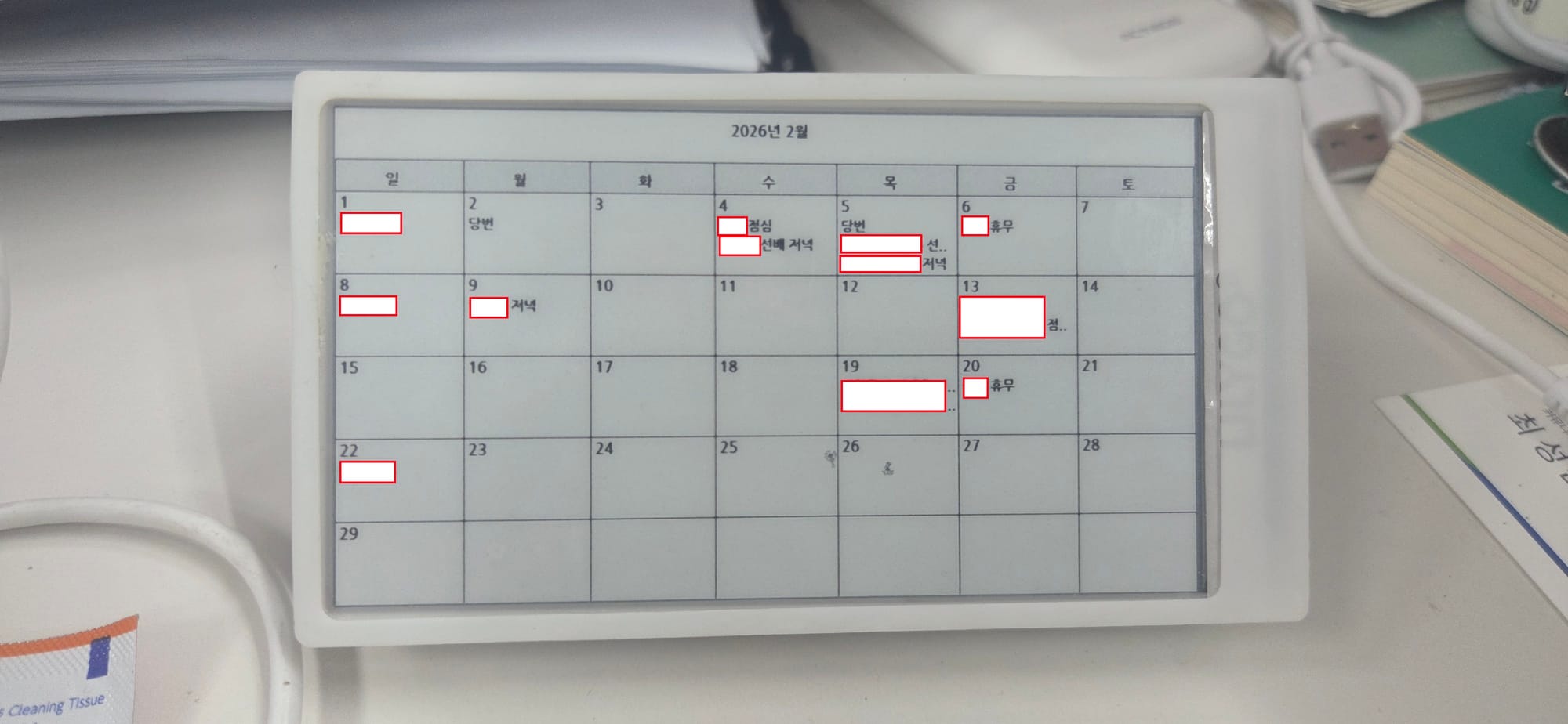
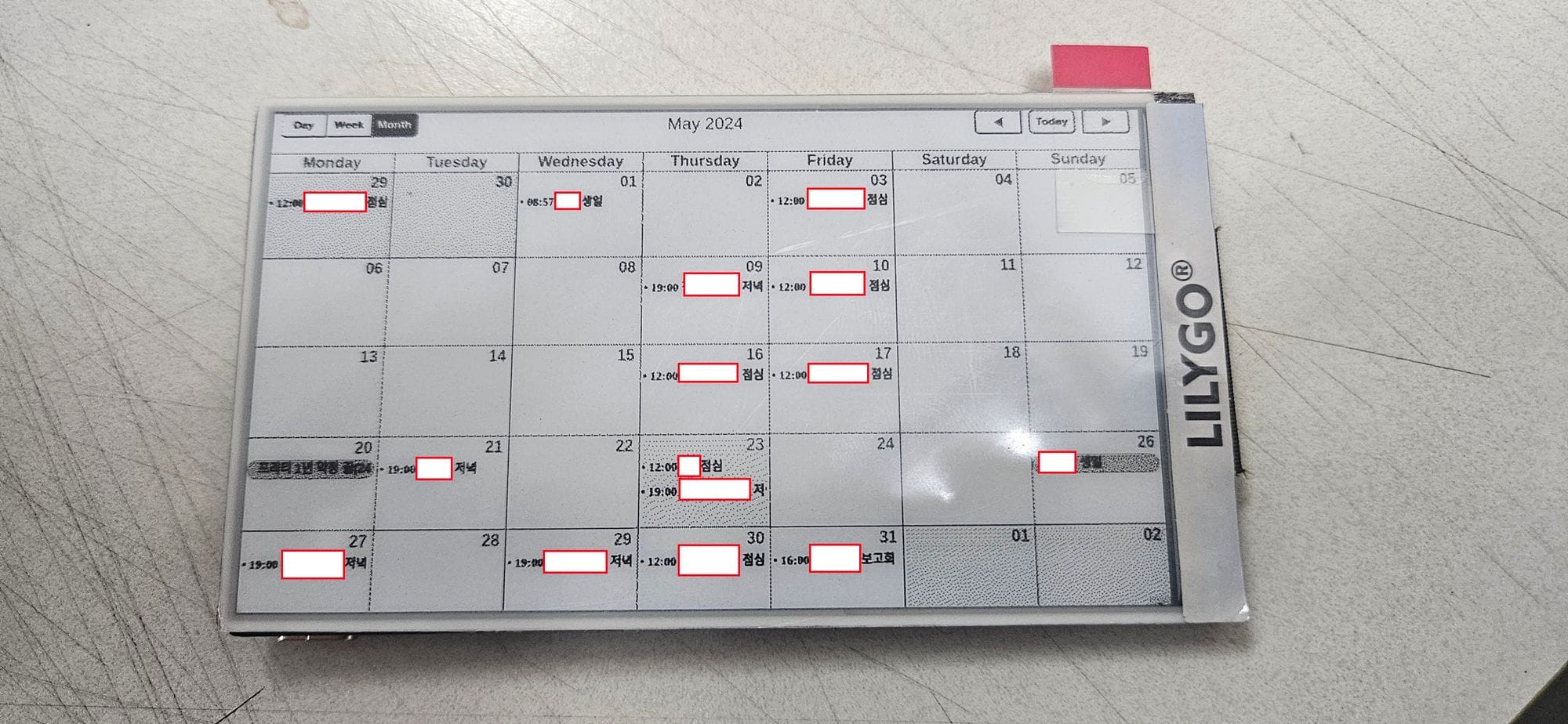
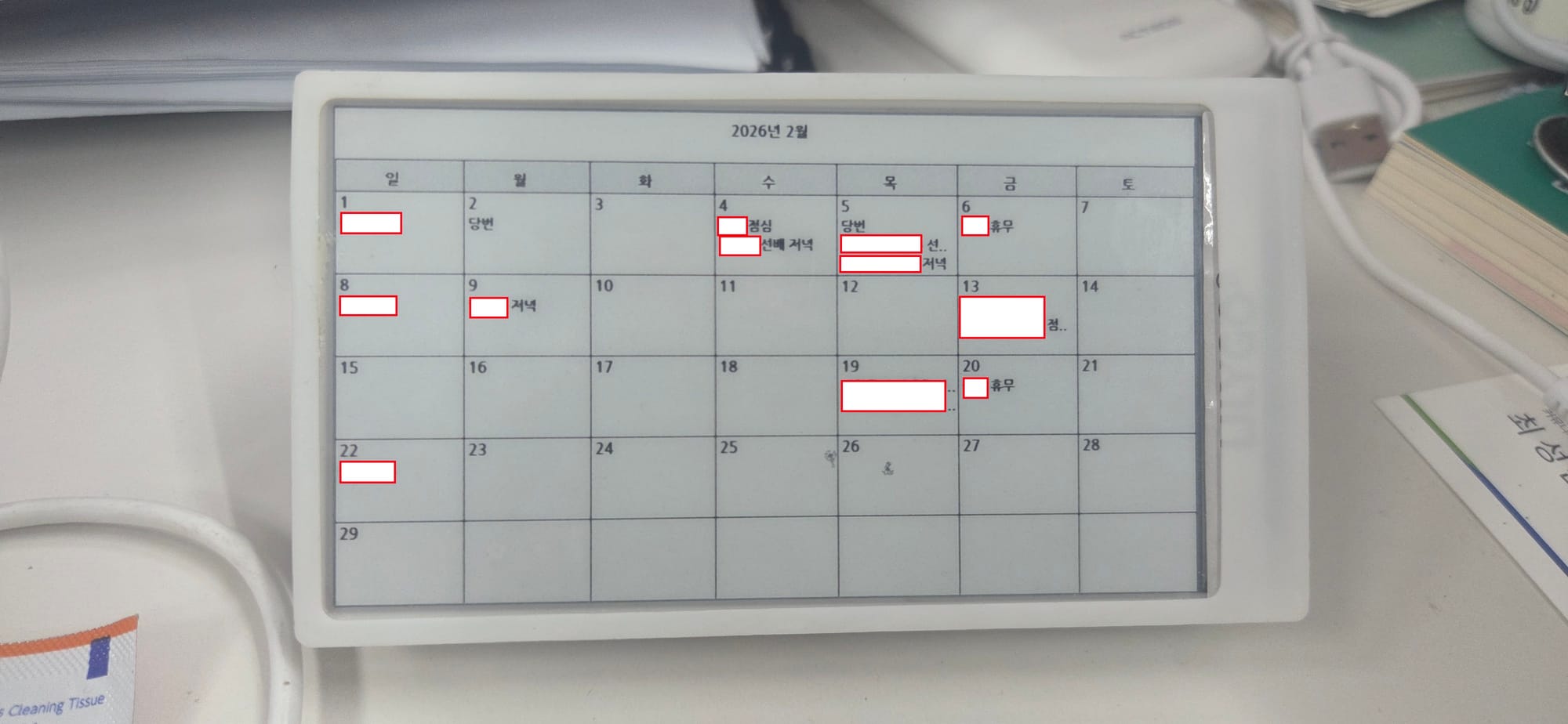
왼쪽이 이번에 옆그레이드 한 것, 오른쪽이 예전 방식. 이전 방식은 캡쳐한 이미지를 불러오는 거라 글씨가 또렷하지 않았다. 못 알아볼 정도는 아니지만.. 글자가 훨씬 또렷해져서 기부니가 좋아졌다.